
AI & automation
AI workflow permissions and approvals for Australian businesses
Give an AI workflow only the access needed for a defined task. Agree which actions it can complete, which need approval and which are outside its scope before connecting business systems. For an Australian business automating supplier invoice intake, that means separating reading an invoice from changing accounting records or authorising a payment.
Write the permission list before the workflow
Imagine a small wholesaler using AI to extract invoice details and prepare an accounts-payable review queue. This is an illustrative scenario, not a client result.
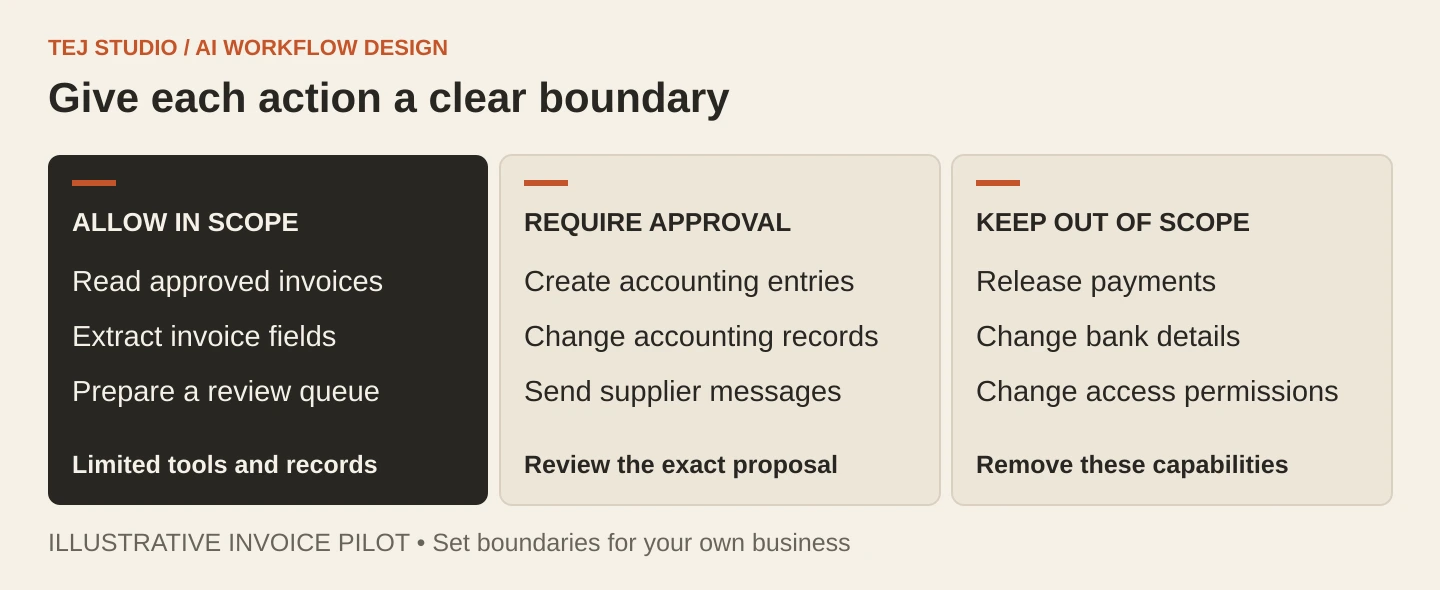
Our practical recommendation is to give every proposed action one of three outcomes:
- Allow within a narrow scope. Read invoices in an approved intake folder, extract fields and save proposed entries in a separate review queue.
- Require approval. Create or change a record in the accounting system, or send a supplier a message using business information.
- Keep outside this workflow. Release payments, alter supplier bank details, delete source invoices or change its own access permissions.
These are starting boundaries for this pilot, not a universal policy. Ask the supplier to enforce them through account permissions and specific tool functions. A prompt saying ‘never make payments’ is weak protection if the connected account can still make them.
Make approval a reviewable decision
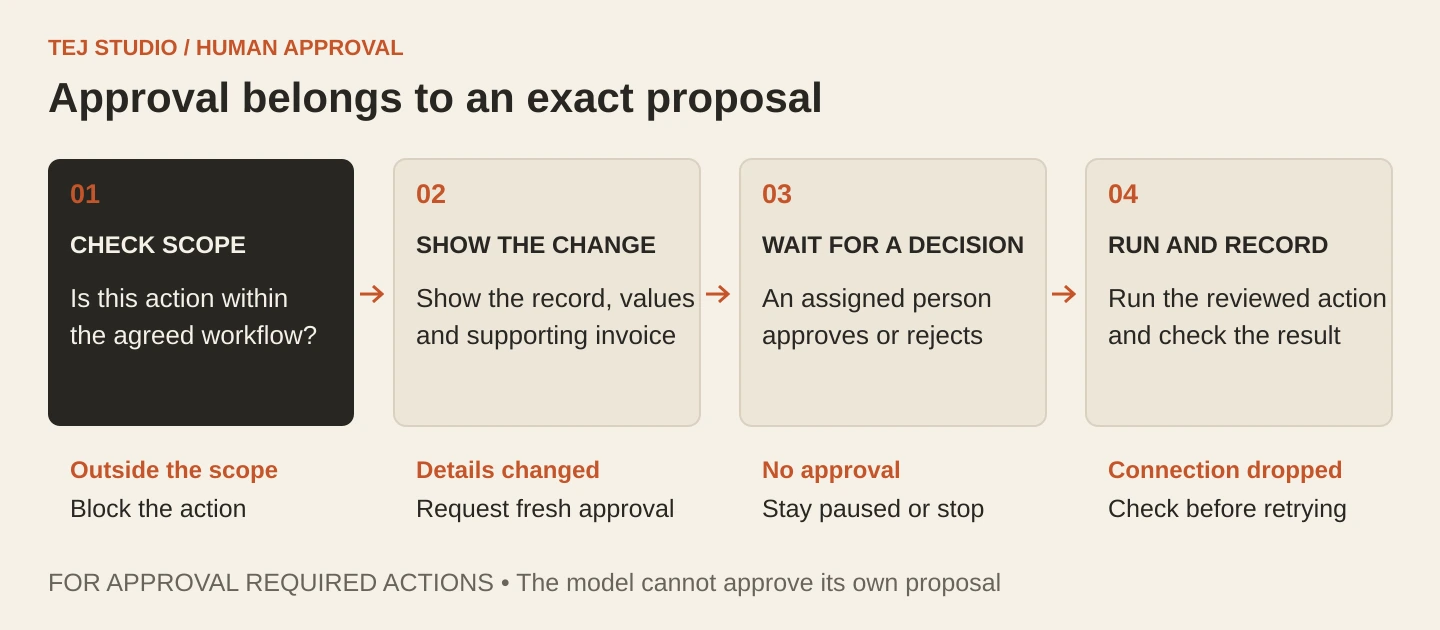
A useful approval screen shows the exact action, affected record, proposed field values and supporting invoice. For an outgoing message, show the recipient, message and attachments. Let the reviewer reject or correct it before anything happens.
Approval should apply to that proposal. If the recipient, amount or affected record changes, request a fresh decision. This is our recommended design rule: the system should execute the reviewed proposal rather than ask the model to recreate it after approval.
Name the person responsible for the queue and a backup. If neither responds, the workflow should remain paused. A timeout should not silently become permission.
Treat outside text as data
An invoice, email or linked document can contain instructions aimed at the AI. That is the practical risk behind prompt injection: content the workflow reads tries to redirect what it does.
For example, a document might tell the system to send other invoices to a new address. The document cannot grant that authority. Restrict available tools, accessible records and outgoing destinations independently of the model’s interpretation.
Extracting defined fields into a fixed format can reduce opportunities for unwanted instructions to spread. It still needs validation. Well-formed data can contain the wrong supplier, account or amount, and no single filter makes a workflow immune to prompt injection.
Test what happens when work must stop
Before launch, ask for a demonstration using synthetic invoices, including a duplicate, a changed bank account, an instruction hidden in a document and an unavailable reviewer. Check that restricted actions are blocked and that a rejected proposal stays rejected.
Also test a connection dropping after an approved action. The workflow should check whether the action completed before retrying, so it does not create a second accounting entry. Record the proposed action, approval decision and execution result, with access to those logs controlled. Give staff a visible pause control and a manual fallback.
A useful acceptance question is: can the supplier show both the work the system completed and the work it correctly refused to do?
Planning an invoice or back-office pilot? Explore Tej Studio’s AI and workflow automation approach, and bring a draft list of permitted actions to the scoping conversation.
Put the thinking to work.
Discuss what these questions mean for your product or business.
AI & automation Start a conversation