
AI & automation
AI model upgrade tests before changing a live workflow
Before changing the AI model in a live workflow, ask the supplier to compare the current and proposed configurations on the same business cases. Review newly failed cases, agree acceptable operating limits and demonstrate a fallback. Make those checks part of the upgrade scope before approving the switch. For an Australian business already using AI to classify support requests or prepare internal summaries, a model upgrade is an operational change. AI model upgrade testing should establish whether the proposed version still does the job your team accepted. A general benchmark cannot answer that business-specific question.
Define exactly what is changing
Ask for a short change record covering the model identifier, provider, prompts, settings and surrounding workflow. Keep the current configuration as a baseline. If prompts or processing steps also change, record them so the comparison describes the complete proposed release.
Ask whether the chosen model identifier stays fixed or can point to another version. Provider naming rules vary. Agree who watches for retirement notices and initiates the next review. A saved configuration is useful only while its dependencies remain available.
Build a test set from the work you actually do
Choose permitted examples that reflect normal workload, awkward inputs and past mistakes. Use synthetic or appropriately approved records, and remove unnecessary personal details. Keep some cases separate from the examples used to adjust prompts.
Imagine an Australian distributor whose existing workflow categorises support messages and prepares a summary for staff. This is an illustrative scenario. Its upgrade tests could include:
- A straightforward delivery query with an agreed category.
- A message covering two issues, with a rule for preserving both.
- A long email chain where the latest request changes an earlier one.
- An unclear request that should go to staff for review.
- Australian spelling and business terminology used by its customers.
Have the workflow owner record the expected outcome before testing. For a summary, specify which facts must survive and which unsupported claims would fail the case. Decide how disagreement between reviewers will be resolved.
Look for newly failed cases
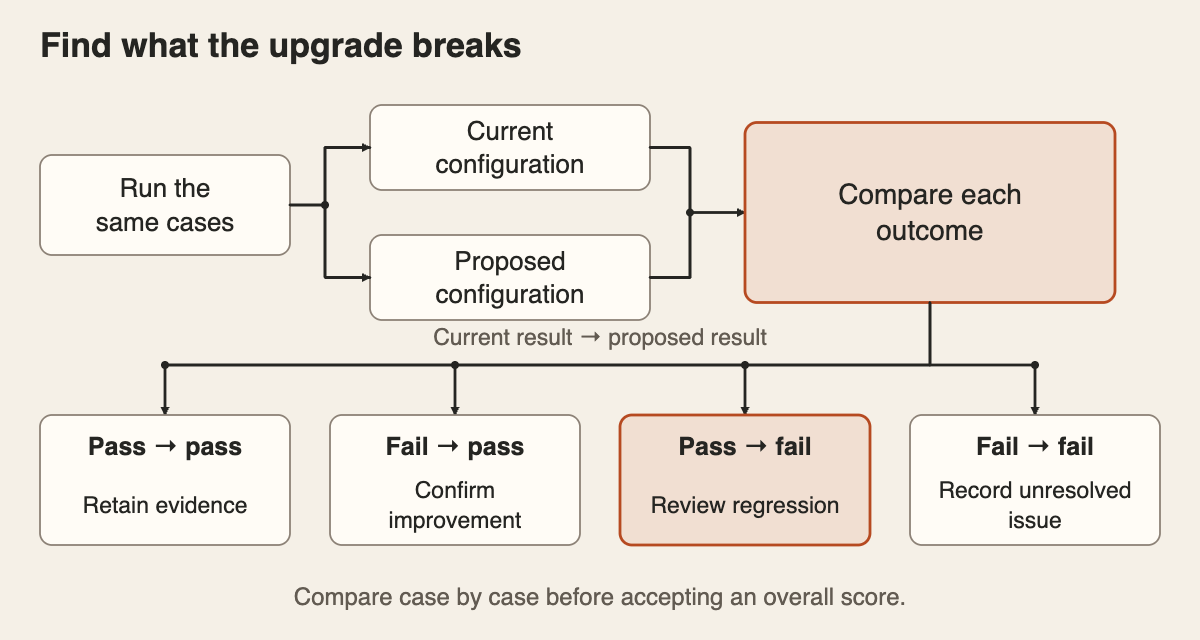
Run the same test set through both configurations using the same scoring rules. Keep each input, output and assessment together. A regression is a case the current workflow handles acceptably but the proposed version fails.
Ask for four groups of results: cases both versions pass, cases newly passing, cases newly failing and cases both fail. That makes the trade-off visible. An improvement across routine messages can otherwise conceal a new failure on a less common but important request.
Agree severity before reviewing scores. For the distributor, omitting a cancellation request could be a release blocker, while an awkward sentence might be a minor correction. These are business decisions to document, rather than thresholds a supplier should invent.
AI outputs can vary across repeated runs. Ask the supplier to repeat important and borderline cases and report inconsistent outcomes. One successful attempt does not establish reliable handling. Set the test volume around the consequences and variety of the work, without treating a small pilot as proof that failures cannot occur.
Check the result and the handoff
Check both the meaning of the response and whether the next system can use it. A correctly formatted category can still be the wrong category. If the workflow expects fixed fields, test missing values, unexpected labels, incomplete responses and cases the model declines to answer.
Use automatic checks for clear rules, such as required fields and allowed labels. Have someone who understands the task review factual accuracy and completeness. If another AI model grades responses, check its assessments against human-reviewed examples before relying on its scores.
Keep existing access and approval boundaries in the regression tests. For defining those boundaries, use our guide to AI workflow permissions and approvals.
Agree operating limits before rollout
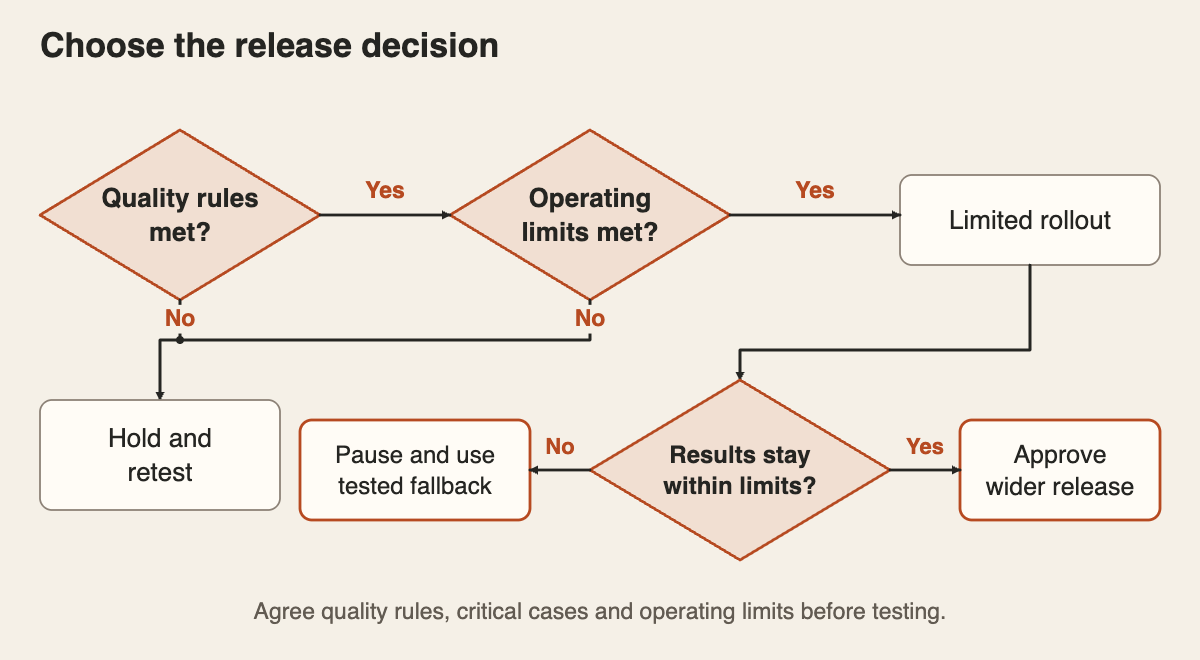
Measure the whole task, including retries and staff corrections. Agree an acceptable completion time, exception workload and running cost for the intended volume. Ask for slow cases as well as the average, and record the assumptions behind any estimate in Australian dollars.
A quicker response has limited value if staff spend longer repairing it. Compare the current and proposed workflow on the same basis, including review effort. Put the acceptance limits in writing before the supplier presents the results.
Start with a limited rollout after the agreed checks pass. Specify the cases included, who watches the results and what triggers a pause. Test how work returns to the previous configuration or a manual process. If the old model is being retired, agree another workable fallback.
Keep an acceptance record for the next change
Request the versioned test set, configuration record, comparison results, unresolved issues and release decision. Name the business owner who accepts the remaining trade-offs and the person responsible for operating the workflow.
Retain new failures as future test cases. Rerun the relevant checks when prompts, models or connected steps change, and review live exceptions after release. Put these responsibilities in your software project brief so ongoing testing has an owner.
Put the thinking to work.
Considering an upgrade to an existing workflow? Explore Tej Studio’s AI and automation services, or email [email protected] with the task and proposed change. Leave out customer records and confidential material from the initial enquiry.
Start a conversation