
AI & automation
AI workflow spending limits: what should stop before the bill grows?
A budget notification is not the same as a spending stop. Before launching an AI workflow, require a pre-job budget check, an allowance reserved for work already in flight, bounded retries and a clear way to pause new requests. Keep those controls separate from the provider’s eventual bill.
Ask what happens before the next request
An AI workflow can look inexpensive during a demonstration and behave differently when staff upload larger documents, request more variations or run several tasks together. The useful buying question is not simply ‘What does one request cost?’ It is ‘What prevents the next request when our allowance is already committed?’
For an Australian business commissioning automation, put that behaviour in the scope alongside the output quality. Specify the billing currency, which charges the allowance covers, and how any Australian-dollar display handles conversion and applicable taxes. Do not assume a dashboard estimate is the amount that will appear on the invoice.
Alerts and enforcement are different controls
Provider controls are evolving. Google Cloud made spend cap budgets generally available for a limited set of services on 13 October 2026. Its current documentation distinguishes those controls from alerts-only budgets: the latter notify, but do not automatically stop usage. Spend caps have defined service and project boundaries, are not enforced instantly, and allow in-flight requests to finish with applicable charges.
That is a reason to inspect the exact product configuration, not assume every ‘budget’ setting is a hard ceiling. Ask the developer to demonstrate the actual stop behaviour for the services your workflow uses.
Our recommendation is to combine provider controls with checks inside the application. Neither an email alert nor a number displayed beside a Generate button should be your only protection.
Show three separate figures
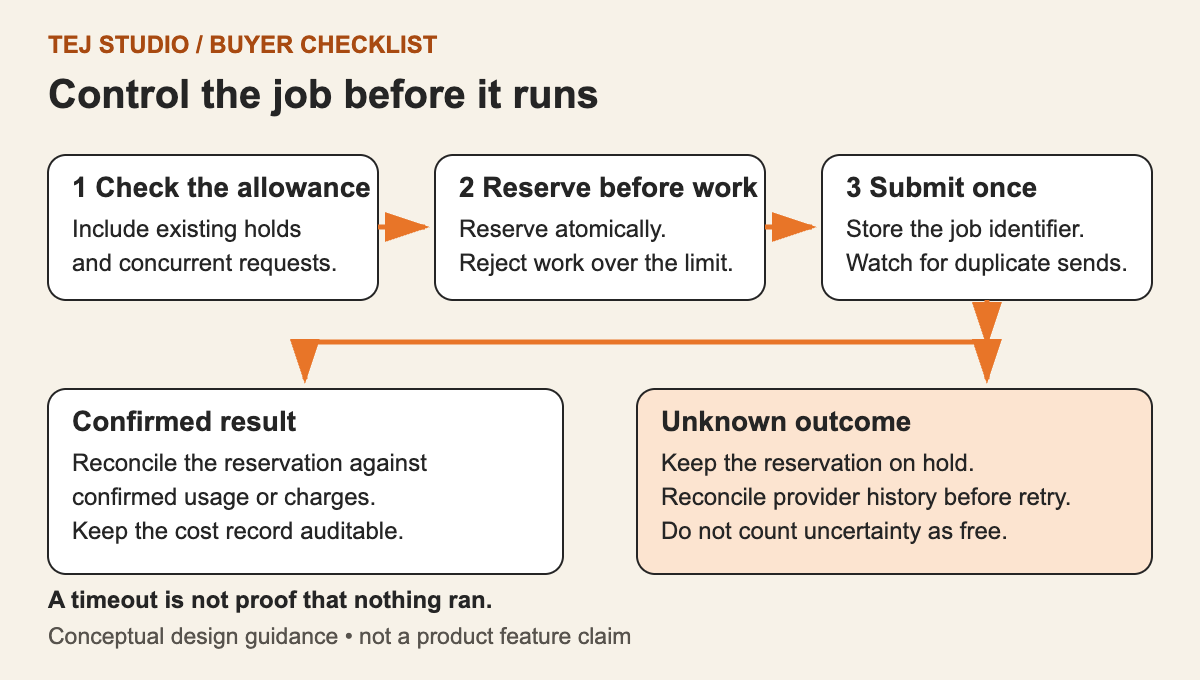
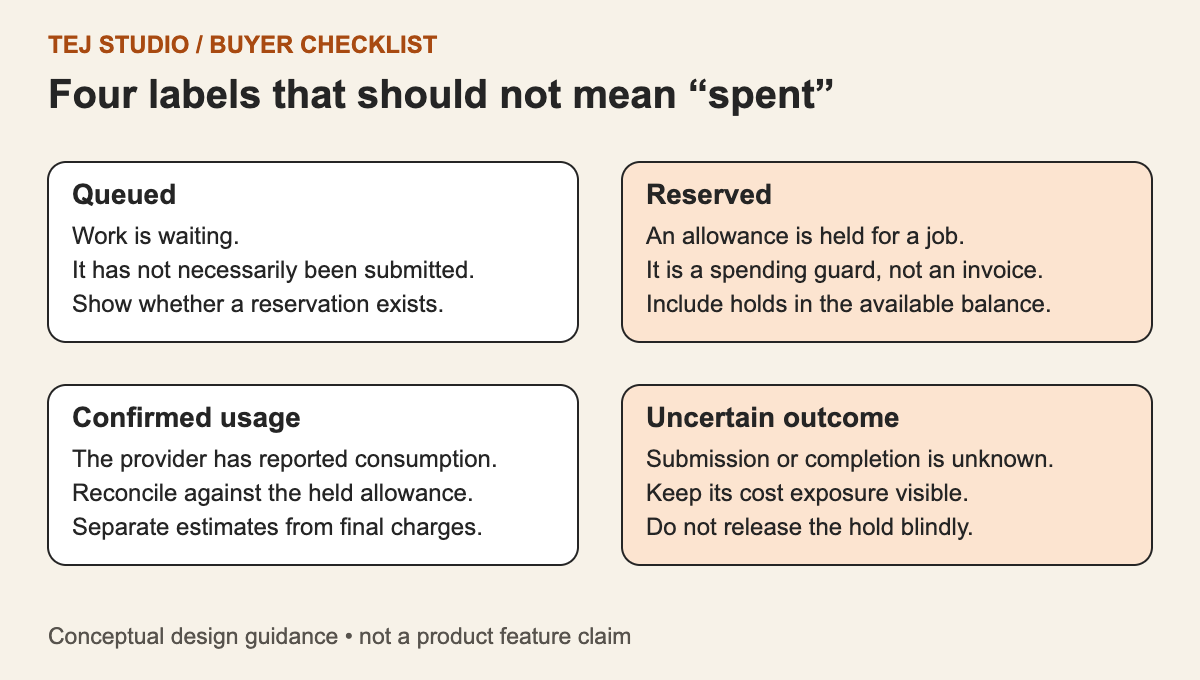
A useful review screen separates the approved allowance, the amount reserved for submitted or queued work, and the provider-reported cost available so far. These figures answer different questions.
Reserve before submitting a job, then reconcile that reservation when its outcome and cost are known. Do not add a settled charge and its old reservation together indefinitely. Equally, do not treat a missing result as evidence that a request was free. This accounting design is a recommendation, not a claim that every provider supplies real-time billing.
- Allowance: what this project, customer or reporting period is permitted to use.
- Reservations: conservative estimates held against work that could still incur charges.
- Reported cost: usage or billing information returned by the provider, with its reporting time and status.
Protect the allowance when jobs run together
Two staff members can each see enough budget for a job and submit at the same time. The application should check and reserve the allowance as one protected operation, so both requests cannot spend the same remaining balance.
Agree limits for the work unit as well: input size, maximum output, number of variations, concurrent jobs and permitted follow-on steps. A workflow that can call another model or tool needs a boundary around the whole task, not just its first request.
When the boundary is reached, the interface should explain what stopped, which outputs were saved and whether any jobs are still running. A pause should not silently discard completed work.
Treat retries as new decisions
Automatic retries can be useful, but ‘keep trying until it works’ is not a complete specification. Separate a failure known to have occurred before submission from a connection loss after the provider might have accepted the job.
For an unknown outcome, our recommended flow is to retain the reservation and check the request status or provider history before resubmitting. Where supported, use the provider’s documented duplicate-prevention mechanism. Do not assume a local job identifier automatically prevents duplicate provider work.
Set a retry limit and record the reason for each attempt. Repeated low-quality output should trigger review of the input or approach, rather than an unlimited paid loop.
Request these acceptance tests before launch
- Submit two jobs together near the allowance: only affordable work should be admitted.
- Interrupt a response after submission: show an uncertain state rather than immediately starting a replacement.
- Restart the application: reservations and job history should survive without duplicate dispatch.
- Reach a retry limit: stop, preserve earlier outputs and explain the next action.
- Pause new work: identify jobs already submitted and distinguish pausing from cancelling.
- Receive delayed billing data: reconcile it without presenting an estimate as a confirmed charge.
Start with a bounded workflow
We recommend beginning with one clearly defined task, a named budget owner and a tested recovery path. Expand after the team can explain both a successful result and an interrupted request. The aim is not to stop useful automation; it is to keep its operating limits understandable.
Put the thinking to work.
Preparing an AI automation brief? Share the task, expected usage and connected systems with Tej Studio to discuss an appropriate starting point.
Start a conversation