
Software & technology
Booking system time zones and daylight saving checks
Before approving a booking website or app, agree which location controls each appointment, how repeat bookings follow local time and what customers see in confirmations. Ask the supplier to demonstrate those rules across an Australian daylight saving change. Put the examples and expected results in the acceptance brief. For an Australian service business, booking system time zones deserve attention even when every customer is in Australia. A Brisbane consultant meeting Sydney clients online can have two different clock times for the same session. The booking page, staff diary and calendar invitation need to preserve that shared appointment.
Start with the Australian difference
Queensland, the Northern Territory and Western Australia do not observe daylight saving. Sydney does, while Adelaide uses a half-hour offset. A rule that simply treats every Australian booking as “Sydney time” will not fit all locations.
On 19 October 2026, a session at 10 am in Sydney is at 9 am in Brisbane and 9.30 am in Adelaide. Sydney's daylight saving began on 4 October 2026 and ends on 4 April 2027. These are useful dates to include in a supplier demonstration.
Use the appointment's date when converting its time. Applying today's difference between two cities to every future booking can produce the wrong result.
Decide which location controls the booking
Write down a rule for each service before choosing labels or settings:
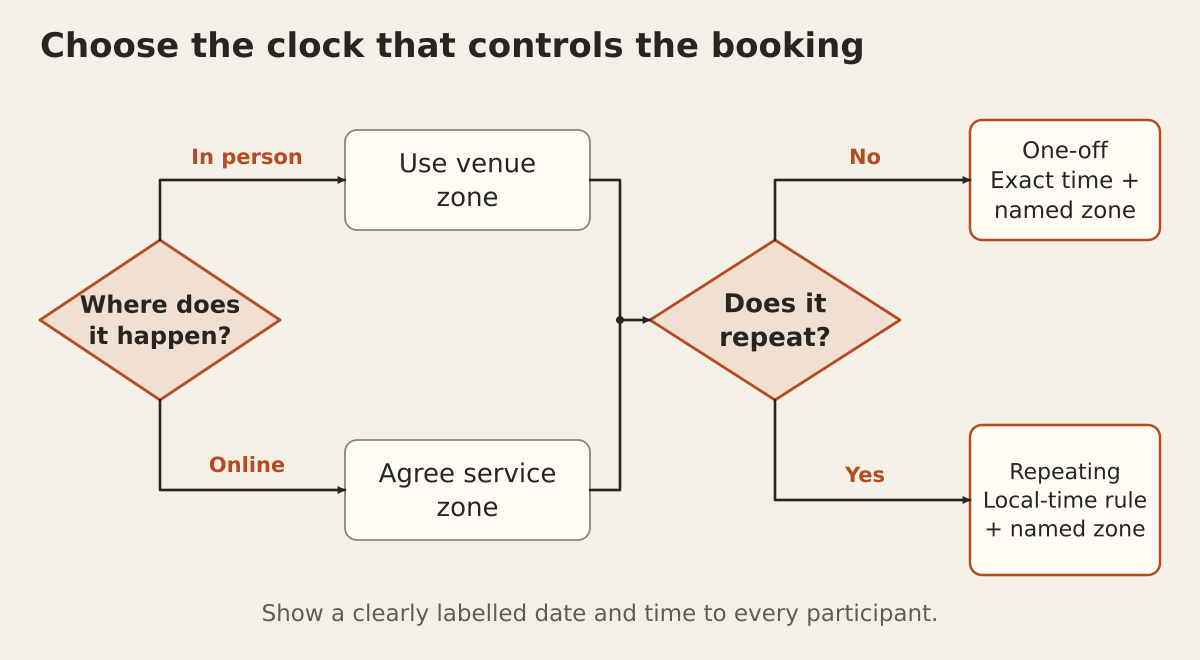
- In-person appointment: show the venue's date and local time prominently, including its location.
- Online appointment: agree the service's scheduling zone, make the displayed zone clear and let the customer change it before selecting a slot.
- Multiple locations: attach availability and opening hours to the relevant location, rather than one company-wide clock.
For online sessions, the customer's device can provide a useful starting suggestion. Ask the supplier to demonstrate what happens when a travelling customer has a different device setting or manually chooses another zone. Changing the display should not silently move an existing appointment.
Behind the screen, request named zones such as Australia/Brisbane and Australia/Sydney. An offset such as UTC+10 alone does not contain a location's daylight saving rules. Customers can see familiar city labels while the system uses the appropriate zone.
Give repeat appointments an explicit rule
“Every Monday at 10 am” needs a location. If the agreed rule is 10 am Sydney time, a Brisbane customer will join at different local times across the daylight saving change.
For example, that series falls at 9 am Brisbane time on 29 March 2027 and 10 am Brisbane time on 5 April 2027. Both sessions remain at 10 am in Sydney.
Ask the supplier to keep the series' local-time rule and named zone, alongside the exact times calculated for individual appointments. Agree what happens when staff edit one session or the whole series. Include future occurrences in the demonstration; checking the first appointment alone will miss this behaviour.
Follow one booking through every message
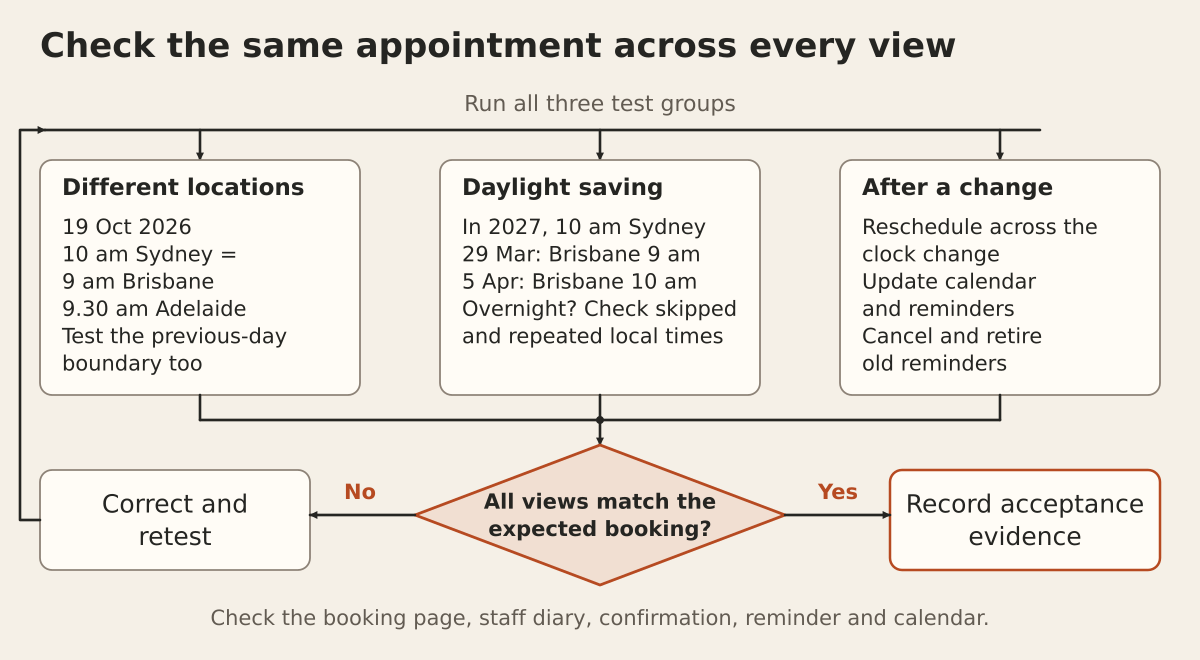
Request a demonstration from slot selection through to the staff diary, confirmation email, reminder and calendar entry. Each view should identify the same appointment, even when it displays a different local time.
A useful confirmation might say “Monday 19 October 2026, 9 am Brisbane time”, with “10 am Sydney time” alongside it when relevant. Avoid leaving customers to interpret an unexplained abbreviation.
Test the calendar file or integration in the calendar apps included in your scope. Then reschedule the appointment and check that the existing calendar event and replacement reminders use the revised time, without leaving a duplicate event. Agree how obsolete reminders are removed so they do not contradict the new booking.
Ask for these acceptance tests
Use test accounts and simulated dates in a safe environment. Record the expected result before the supplier runs each case.
- Different cities: book the same online session from Brisbane and Sydney. Both customers and the staff diary should refer to the same moment.
- Half-hour difference: include Adelaide. Check the minutes as well as the hour in every customer message.
- Date boundary: test 12.15 am Sydney time on 19 October 2026. Brisbane should show 11.15 pm on 18 October. Check the displayed day and date.
- Repeating series: run appointments on both sides of the April change and confirm which city's clock stays fixed.
- Clock-change edge: if overnight appointments are supported, test skipped and repeated local times. In Sydney, 2.30 am did not occur on 4 October 2026; it occurs twice on 4 April 2027. Agree whether the system rejects a selection or asks the customer to choose an unambiguous alternative.
- Changed plans: move a booking across the changeover, then cancel it. Check the staff record, calendar update and outstanding reminders after each action.
Put ownership in the quote
Ask who maintains time-zone data and checks connected booking tools after updates. Time-zone rules can change, so agree how affected future appointments would be reviewed and communicated to customers.
Include supported locations, recurring-booking rules, calendar apps and test evidence in your software project brief. These requirements can help you assess an existing booking product or scope web application development.
Put the thinking to work.
Planning a booking feature? Email [email protected] with the services, locations and calendar tools involved. Tej Studio can help you define the checks to discuss before committing to a build.
Start a conversation