
Software & technology
Software backup restore testing before sign off
Before you accept a business app, ask the supplier to restore it in a safe test environment and complete a real business task. The evidence should show which records and uploaded files returned, how long recovery took, and what still needed manual work. For an Australian business buying custom software, the useful question is simple: if this app disappeared, could the team resume work with the information it needs? A backup schedule alone leaves that question open. Include a witnessed restore test in the scope before launch, while missing pieces can still be resolved.
Check what the backup actually contains
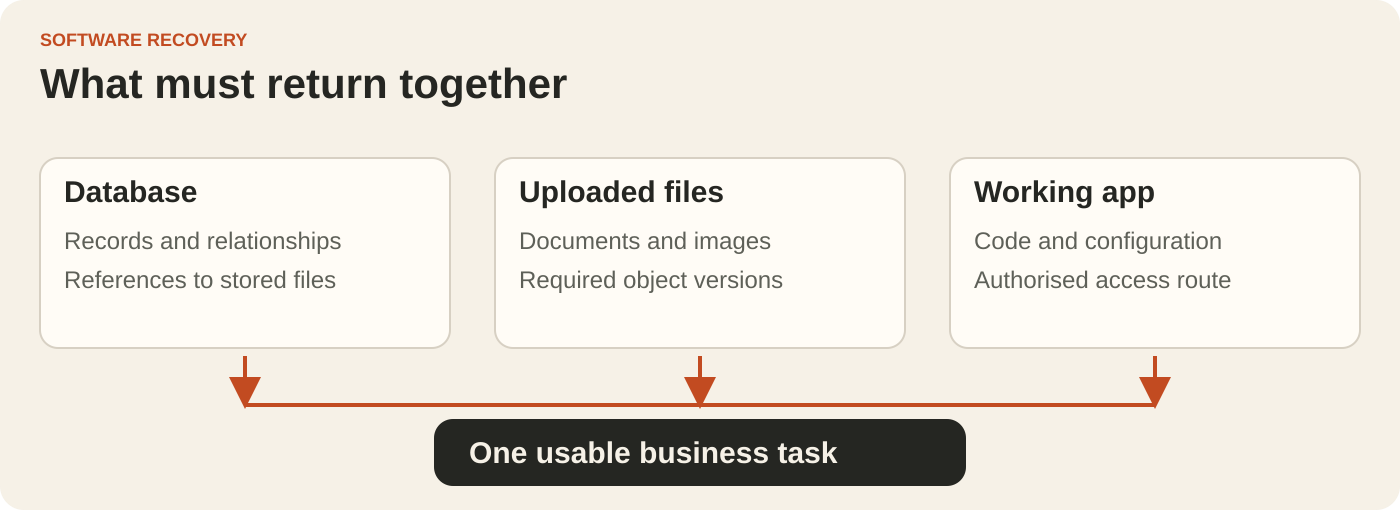
A customer portal might store job details in a database, signed documents in file storage and application settings somewhere else. Each part needs a recovery method. Ask the developer to list the database, uploaded files, application code, configuration and connected services, with an owner for each.
There is a concrete trap for apps built with Supabase: its database backups include metadata about Storage objects, but do not include the objects themselves. Restoring a database can bring back a document record without bringing back a deleted document. Ask explicitly how the underlying files and their versions will be recovered.
For any platform, record what is included, what is excluded, how far back recovery is possible and what happens if the main project or account becomes unavailable. Keep credentials in an approved secure vault; the recovery guide should identify the authorised access route without containing secrets.
Agree how much work the business can lose
Set two targets in everyday language. The recovery point objective describes the acceptable data-loss window. The recovery time objective describes the maximum acceptable time between an interruption and service being restored. Choose these around the business process, then have the supplier explain the design and running costs needed to support them.
A daily backup may leave changes made since the latest usable recovery point outside the restore. Ask how those changes would be identified and reconstructed. A booking business, for example, may need to reconcile bookings against payment records or confirmation messages held in another system. Treat that as planned recovery work.
Define when the recovery clock starts and what counts as restored service. Include investigation, obtaining access, restoring data, reconnecting dependencies and checking the result. A database job finishing successfully is only one milestone.
Restore an app that can safely be tested
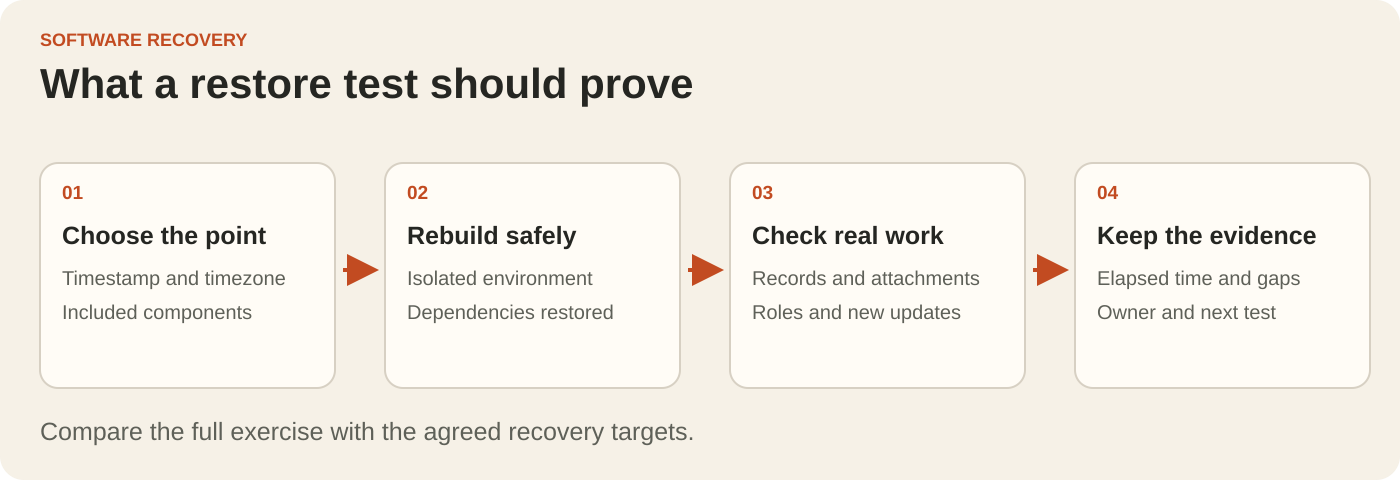
Use an isolated environment that cannot email real customers, take payments or replay production integrations. Agree how any copied personal information will be protected, who can access it and when the test environment will be removed. Representative test data may be enough for some checks; document its limits.
Choose a specific recovery point and record its timestamp and timezone. Ask the developer to explain how database records and stored files are brought back to a consistent state. Restoring each component from a different moment can leave an attachment reference pointing to a missing or outdated file.
Then let someone from the business follow the recovery instructions with the supplier present. This shows whether the process depends on undocumented knowledge, access held by one person or a service that the test has quietly skipped.
Test the work your team needs to resume
Agree the acceptance checks before the demonstration. Pick a representative task and include its awkward cases, rather than accepting a working login screen as the whole test. For a service portal, ask the team to:
- Open a recovered job and compare its status and history with the selected recovery point.
- Download its attachment and check that the file opens and is the expected version.
- Sign in as a customer and a staff member, checking that each sees only the appropriate records.
- Complete a new test update and confirm that the record can be saved and retrieved.
- Check how outstanding payments, queued messages or external updates will be reconciled before normal operation resumes.
Record the result of each check, the evidence, any missing dependency and the person responsible for resolving it. Measure the full exercise against the agreed targets. If a manual workaround is needed, describe the steps and have the business decide whether it is acceptable.
Make recovery evidence part of acceptance
Ask for a short record containing the recovery point, restored components, elapsed time, business checks, unresolved gaps and the next test date. Keep the tested instructions somewhere the business can reach during an outage. Confirm who monitors failed backups and who is authorised to begin a real recovery.
Request separate allowances for backup storage, file protection, test environments and ongoing restore exercises where they affect the quote. Agree when the test should be repeated, including after material changes to storage, authentication or integrations. A successful exercise demonstrates the tested scenario; it does not guarantee every possible outage is covered.
Put the thinking to work.
Use the broader website and software handover checklist to cover ownership and support. For a new custom software project, bring the critical business task and acceptable recovery window to Tej Studio so recovery can be discussed in the initial scope.
Start a conversation