
Learning & LMS
LMS course updates and learner progress checks
Before approving an LMS course update, decide which learners should receive the new version, which should finish the existing one and whether anyone needs a fresh attempt. Ask the supplier to demonstrate those routes while keeping earlier completion evidence retrievable. Put the release rules and acceptance checks in the scope before replacing the live package. For training providers and workplace learning teams, LMS course version updates are an ongoing buying requirement. A revised assessment or procedure can affect people halfway through training and people who finished months ago. This guide focuses on updating packaged learning content within an existing platform.
Start with the learning change
Write a short release note describing what changed and why. Separate a wording correction from a revised assessment, new learning requirement or reorganised course. Ask the content author whether the package structure, identifiers, scoring or completion rules changed during republishing.
Then have the training owner decide what learners need to do. A corrected image may justify continuing the current attempt, subject to testing. A changed procedure may require a new assignment, even for people who previously passed. Record that decision independently of whichever upload option the LMS offers.
For example, an updated induction could allow current learners to finish the earlier release while new starters receive the revision. Treat that as a proposed policy requiring approval and technical verification.
Clarify what package replacement does
Have the supplier explain the proposed operation: overwrite the existing package, add a managed version or create a separate course activity. Ask which records and learner links each option affects.
Platform behaviour differs. Moodle’s SCORM documentation warns that replacing a package with different item identifiers in its manifest can delete tracking data. Ask the supplier to check those identifiers before testing; retaining them alone does not prove the revised content will resume correctly.
SCORM Cloud handles managed versions differently. It retains older versions and their history, and new registrations use the latest version. Moving an existing registration to a newer version creates a new registration instance and effectively resets that learner’s progress. Its default setting keeps existing registrations on their original version.
In SCORM Cloud, that transition rule applies at course level. Ask the supplier to demonstrate your group rules and identify any separate courses, assignments or integration work needed to deliver them.
Get the behaviour confirmed for your exact LMS, player and configuration. Avoid accepting “SCORM compatible” as the answer to a version-update question.
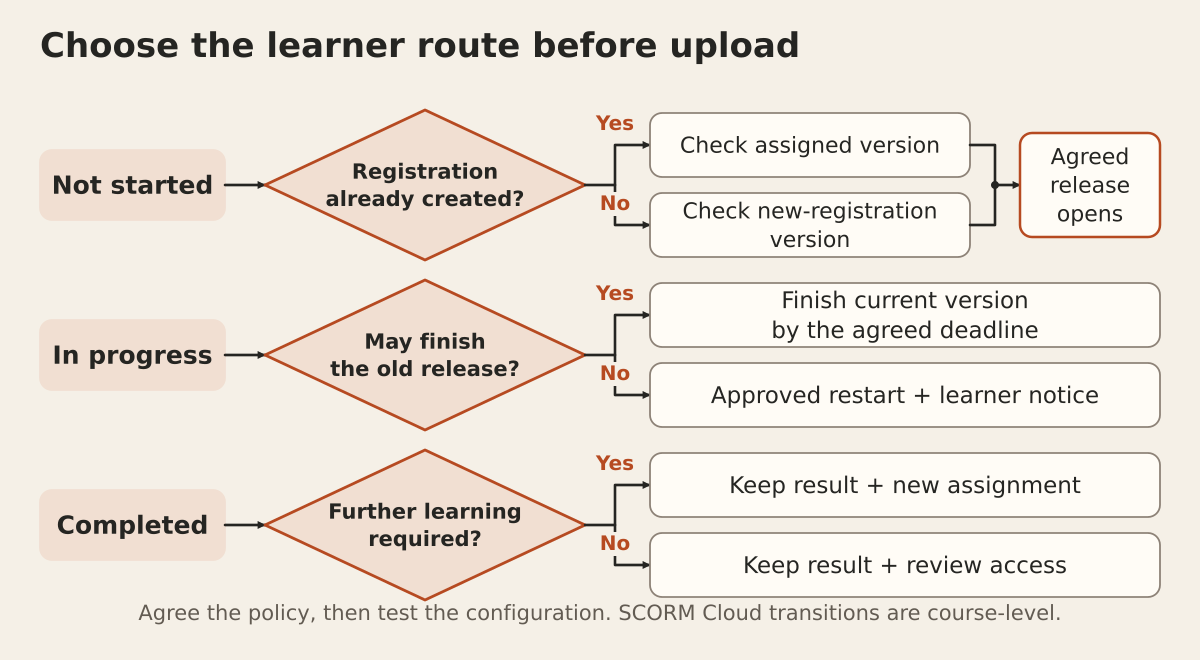
Agree the route for each learner group
Give the supplier three explicit rules:
- Not started: which version opens, including learners already assigned before the release?
- In progress: do learners finish the current version or begin an approved new attempt?
- Completed: does the earlier result remain available, and is additional learning required?
An enrolment date and a first launch can be different events. Ask when your integration creates its registration, the record linking a learner to that course, so an assigned but untouched course follows the intended rule.
Specify any deadline for finishing the old version. If a restart is necessary, agree the learner message, due date and support route. Keep the previous completion identifiable when assigning updated training, so administrators can explain both events.
Prove resume behaviour after the update
Use permitted course copies and fictional learner accounts in a test environment matching the proposed production setup. Create progress in the old package before applying the exact update procedure planned for release.
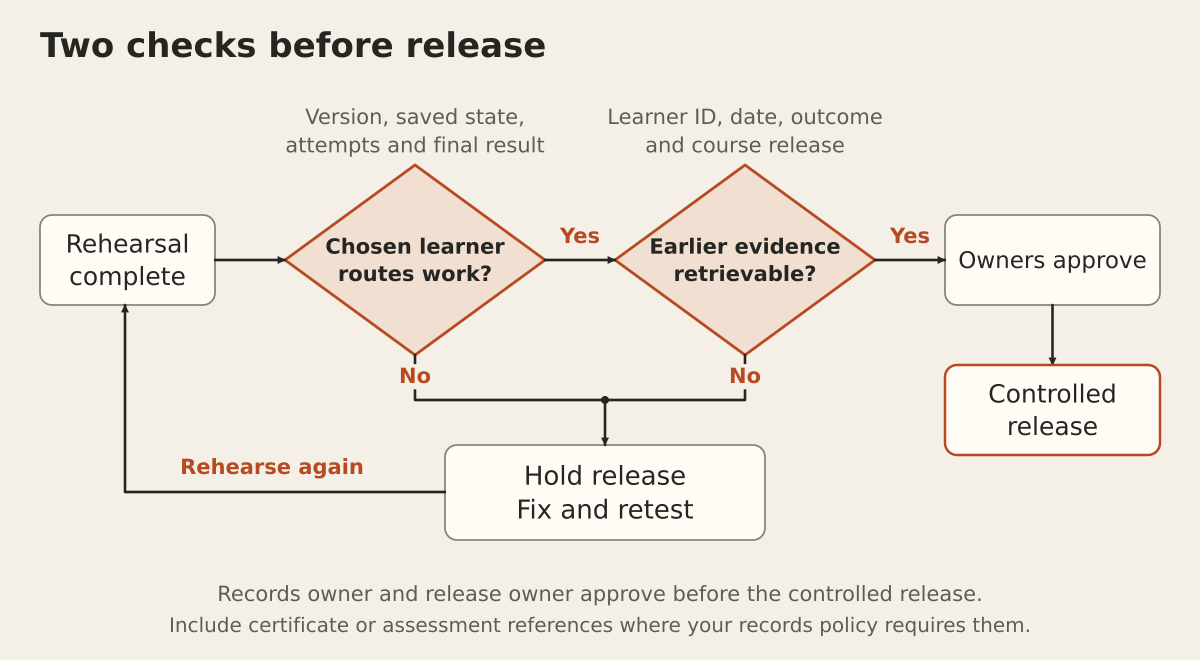
Leave one learner midway through content and another midway through an assessment. After updating, reopen both accounts. Check the version shown, saved location, answers, available attempts and eventual result against the agreed route.
Moodle notes that authoring tools may store important information in the SCORM suspend-data field. A supplier therefore needs to check that the relevant package can use the saved state. Keeping a database record does not establish that the learner can continue successfully.
Also test a completed learner reopening the course and an assigned learner’s first launch. For baseline package tests, use the LMS SCORM compatibility checklist.
Retrieve the earlier completion evidence
Ask an administrator to find a specific completion recorded before the update. Check the learner identifier, completion date, outcome and associated course release. Include assessment evidence or certificate references where your organisation needs them.
Agree how the release is identified if the standard report lacks a version field. Keep the released package, release notes and a dependable link between the learning record and the content delivered.
In SCORM Cloud integrations, a registration-progress request without a specified instance returns the most recent instance. Ask the supplier to demonstrate how earlier instances reach your reporting or archive view. Data retained by a service still needs a usable retrieval route for your team.
Have your records owner approve the required evidence and retention arrangements. Do not assume a current completion badge answers a question about an earlier release.
If completion settings also change, test their effect on earlier statuses and dates before unlocking or resetting those settings.
Make release and recovery part of the quote
Request separate scope for package preparation, configuration, rehearsal, reporting changes and administrator handover. Name who approves the content change, checks the results and authorises release.
Before launch, agree how to stop a faulty release and recover affected records. Keep the previous package and appropriate backups, and ask what happens to learning completed after the update if recovery is needed. Re-uploading an older file alone should not be treated as a demonstrated data-recovery plan.
Put the thinking to work.
Explore Tej Studio’s LMS planning service, or email [email protected] with your platform, content format and update scenario. Leave learner records out of the initial enquiry.
Start a conversation