
Learning & LMS
LMS HR integration: starter, role-change and leaver checks
A useful LMS HR integration must put the right person into the right training, respond when their job changes and stop access when they leave. Before approving a proposal, ask the supplier to demonstrate all three journeys, including failed updates and the effect on training history. For Australian HR and learning teams, the buying decision starts with everyday staff changes. Agree which system owns each field, how quickly changes must reach the LMS and who fixes exceptions. A successful sign-in alone does not show that the integration has assigned the right courses.
Separate identity, cohorts and enrolments
Treat the connection as several linked responsibilities:
- Identity: match the HR record to the correct LMS account.
- Staff attributes: update the agreed department, location, job and employment status fields.
- Cohorts: place people into the groups used to assign learning.
- Enrolments: give those groups or individuals the required courses.
- Access: activate, restrict or suspend access at the agreed time.
Ask which system is authoritative for each responsibility. HR may own employment status, an identity provider may manage sign-in and the LMS may own completion records. Specify which fields can be edited locally and whether the next synchronisation will overwrite them.
Choose an identifier that stays stable through ordinary name and email changes. Document how it maps to the LMS and what happens when someone returns with a new HR record. An email change should not create a second learner with an empty training history.
Keep the data transfer narrow. The LMS needs the fields required for identity and learning rules, not a copy of the whole personnel file.
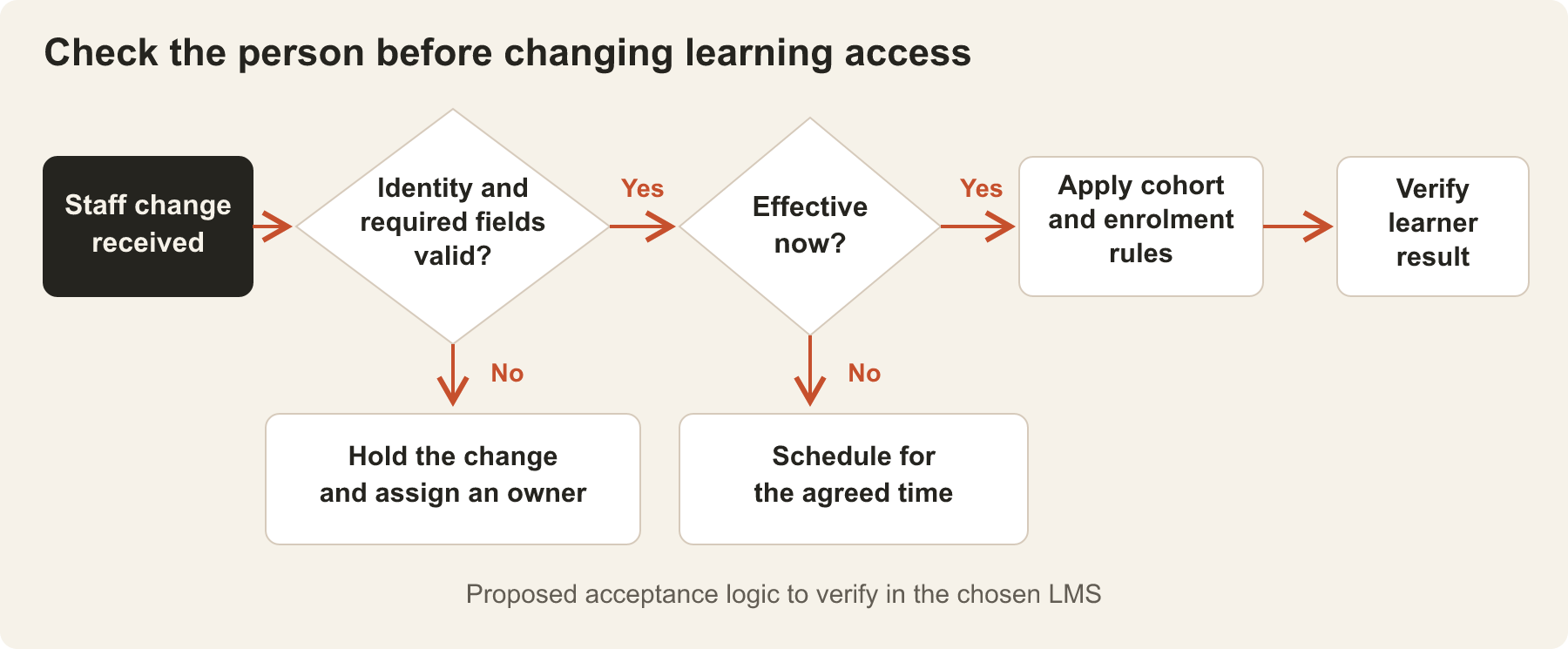
Check a starter beyond their first login
Use a fictional starter to test the full sequence. Can the integration create or match the account, apply the correct cohort memberships and make the required training available when intended?
Include a future start date and a missing required field. Agree whether an incomplete record is held for correction, who receives the exception and how it is resolved. Ask what happens if a starter has no work email yet rather than letting the implementation invent a placeholder policy.
Make the timing explicit. A scheduled import may produce a different experience from an event-driven connection. State the acceptable delay and the time zone used for effective dates, especially if staff work across Australian states.
Check the learning allocation too. Someone working across two locations may need both sets of training. Someone joining a team with existing completion evidence may need a review of that evidence rather than automatic reassignment of every course.
Test what a role change removes
Moving a person into a new cohort is only part of a role change. The integration must also handle old memberships and decide what happens to existing learning.
In Moodle, cohort sync connects cohort membership to course enrolment. Removing a member can therefore remove their enrolment in linked courses. A one-off bulk enrolment of a cohort behaves differently: later membership changes do not automatically update those enrolments.
Ask the supplier to demonstrate a department transfer using a learner who has completed one course and started another. Review:
- Which new courses are assigned, and when?
- Which old requirements cease to apply?
- Can the learner finish an agreed transition course?
- What happens to earlier attempts, completions and dates?
- Does any separate enrolment still provide access?
Do not assume that removing a course assignment preserves every participation record. Full unenrolment can remove course data. Agree the intended result before choosing the mechanism, then inspect the actual records after the test.
Stop leaver access without casually deleting evidence
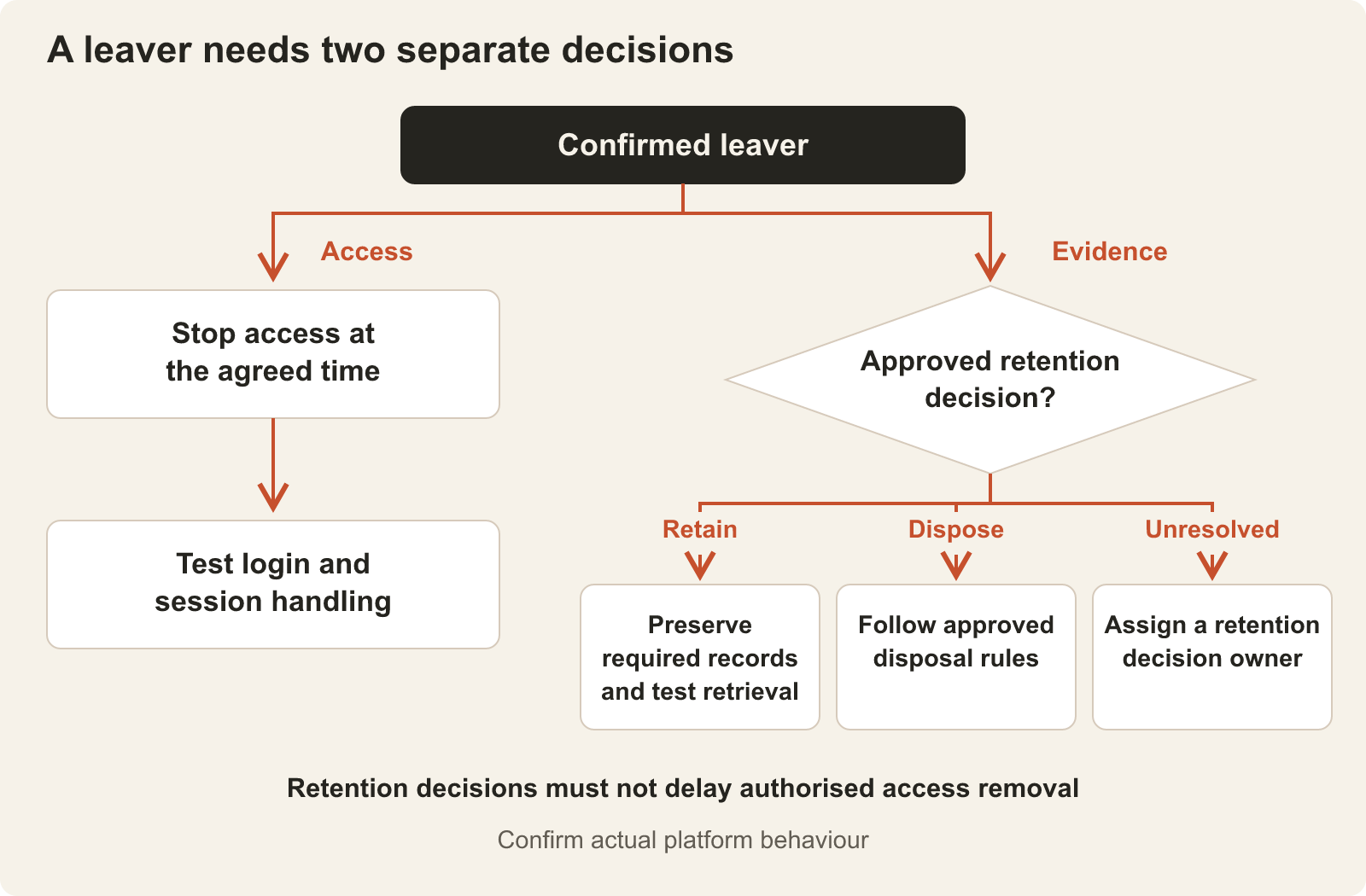
Offboarding needs separate decisions about access and retention.
In Moodle, suspending a user account prevents login; deleting the account removes user data. Suspending one course enrolment is narrower, and other access routes may remain. The supplier should show which action the integration performs rather than describe every option as “deactivation”.
For a leaver, agree the effective time, how the identity service and LMS are updated, and how existing sessions are handled. Check the result from the learner’s side. An HR status change or a successful job log is not enough evidence that access has stopped.
Separately, identify the training evidence your organisation needs to retain, who can retrieve it and the approved retention and disposal rules. Suspension is an access control, not a complete records policy. Test the required history after suspension and confirm that later housekeeping will not remove it unexpectedly.
Include a returning employee in the test plan. Reusing an existing account should not silently restore obsolete access; creating a new account should not silently separate the person from evidence your organisation still needs.
Make failed imports visible and recoverable
A missing person in an export is not necessarily a leaver. The file could be incomplete, the connection could have failed or an upstream filter could have changed.
Require the design to distinguish a confirmed employment change from missing or unreliable data. Define checks for empty files, unexpected volumes, invalid identifiers and partially processed batches. An incomplete feed should trigger investigation rather than an unreviewed mass removal. Keep an authorised urgent-offboarding process available when normal synchronisation fails.
Ask for a usable exception record: the affected identifier, attempted change, failure reason, last successful update and named owner. Restrict access to these logs and avoid copying unnecessary personnel information into support tickets.
Test recovery by correcting a rejected record and replaying it. The expected result is one correctly updated learner, without duplicate accounts or repeated assignments. Reconcile the intended HR changes with the resulting accounts, cohort memberships and enrolments, not just a total marked “processed”.
Put these checks into the buying brief
Before sign-off, request a field map, effective-date rules, access and retention decisions, an exception-handling process and evidence from the starter, role-change, leaver and retry tests. Name the HR, IT and learning owners who will accept the results.
Use these requirements to compare proposals. Confirm which behaviours are included, which depend on a connector or additional development, and who supports the connection after launch.
Put the thinking to work.
Planning an LMS HR integration? Explore Tej Studio’s learning management system services or discuss your requirements. Start with the systems and staff-change scenarios involved, without sending actual employee records.
Start a conversation