
Software & technology
Mobile app deep links: checks before launch
Before approving a mobile app, test the links customers will actually receive. A booking reminder, shared product or episode link should lead to the intended destination, preserve that destination through sign-in and offer a useful alternative when the app cannot open it. Put those outcomes in the acceptance brief. For an Australian business commissioning an app, mobile app deep link testing connects the website, customer messages and app experience. “The app opened” is only the beginning of the check. The customer still needs to reach the right content with the right access.
Start with three real customer journeys
Choose links that matter to your first release. For example:
- A customer opens a booking reminder and checks their appointment.
- A member follows a link to a document they are permitted to view.
- A viewer shares an episode with someone who has not installed the app.
For each journey, record the original link, intended destination and expected result when the customer is signed out. Agree what should happen if the content has been removed or is no longer available.
These examples make a more useful demonstration than repeatedly opening the app’s homepage.
Keep the website useful
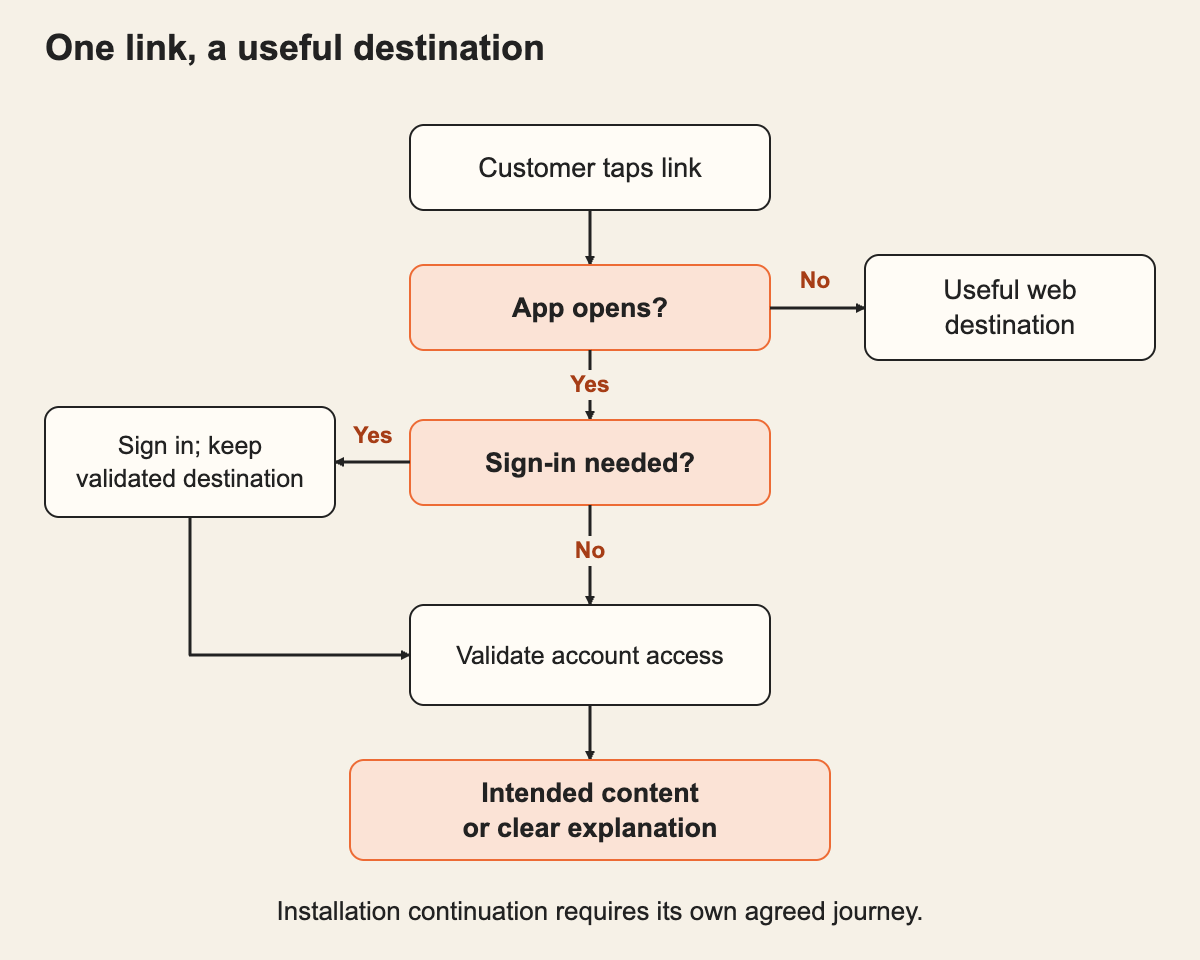
Android App Links and Apple universal links associate website addresses with an app. Supported links can open matching app content; without the app installed, the address can open in a browser.
That leaves a product decision: what will the browser show?
A booking link might offer a secure web journey. An episode link might show its description and available viewing options. Avoid sending every visitor to an unrelated homepage or leaving them with an unexplained error.
Also agree whether continuing after app installation is required. Treat that as a separate journey to demonstrate, rather than assuming an ordinary web-to-app link will remember every earlier step.
Carry the destination through sign-in
Ask the supplier to open a protected link while signed out, complete sign-in and show the final screen.
Our recommendation is to preserve a validated destination, then check the signed-in person’s permission before displaying it. If the account cannot access the item, provide a clear explanation and a safe next step.
Repeat the test with a different account and a changed or malformed link. A customer-controlled address should not grant access simply because it contains a plausible record number. Nor should opening a link silently confirm a booking, delete a record or perform another consequential action.
Expect device and browser differences
The same link can behave differently depending on where it is opened. For example, a same-domain link tapped while browsing in Safari can remain in the browser rather than opening the iPhone app.
Android’s current documentation also records a September 2026 Google Play services fix for an issue affecting dynamic link exclusions on some Android 15-and-later devices. This is a vendor-reported fix, not proof that every customer device has identical behaviour.
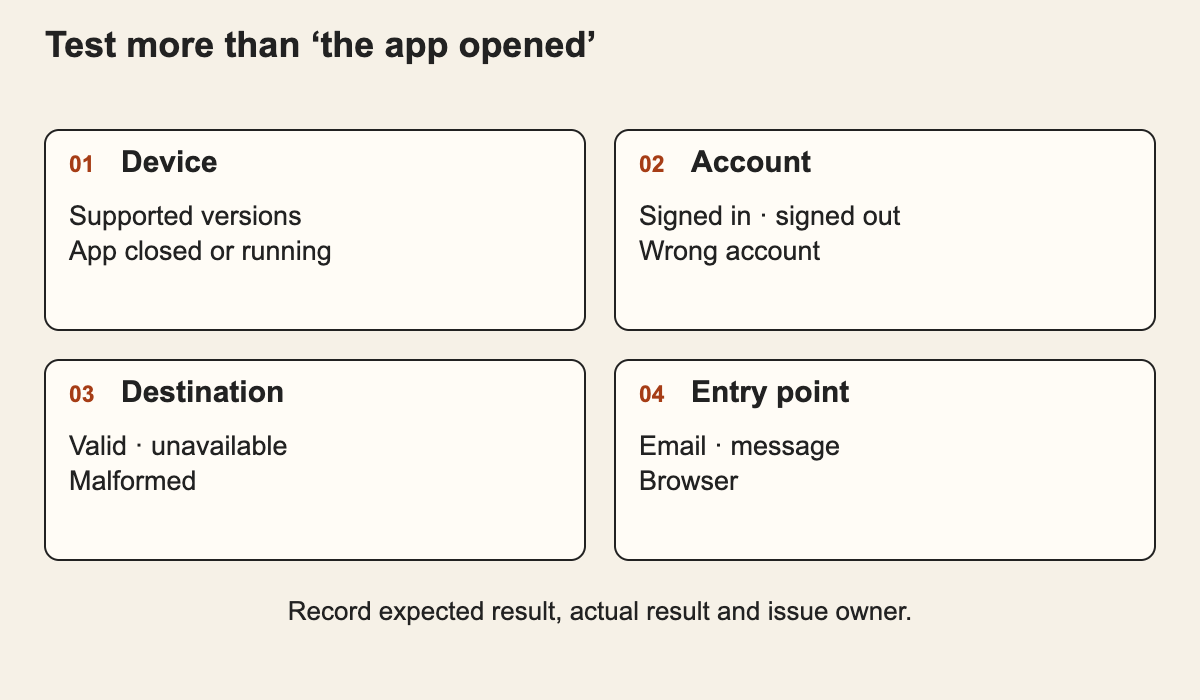
The practical lesson is to test the agreed operating-system versions and entry points. Include the messaging, email and browser apps your customers use, plus the app fully closed and already running. Avoid promising that every tap will always switch to the app.
Request evidence before sign-off
Ask for a compact test record covering:
- App installed and not installed.
- Signed in, signed out and signed in with the wrong account.
- Valid, unavailable and malformed destinations.
- Supported device versions and relevant browsers.
- Back navigation after opening the destination.
- Behaviour after a routing-rule or website-domain change.
Record the actual result, unresolved issue and person responsible for fixing it. Include ownership of the website association configuration in the handover, so a later hosting change does not quietly break customer links.
A focused first release can start with a small, agreed set of destinations. Expand it once those journeys work reliably.
Put the thinking to work.
Planning mobile app development? Bring the customer messages and destinations you need to support. Discuss your requirements with Tej Studio to include them in a practical first-release scope.
Start a conversation