
OTT & media
Multilingual OTT audio: what happens when viewers change language?
A multilingual catalogue needs more than a language button. Agree which audio starts, how a viewer's choice is remembered and what happens when the next title lacks that language. Then test the actual sound, not just the menu label.
Start with a viewing journey, not a feature checkbox
Imagine an Australian viewer watching a Punjabi drama with an English-speaking partner. They select an English dub, return the next evening and continue on the television. A menu that lists both languages has not answered the important questions: does the choice survive, does the same episode resume, and what happens when the following episode has no English dub?
For a regional film service, cultural broadcaster or short-form drama app, those are product decisions. Put the expected outcomes into the development brief before accepting 'multi-audio support' as complete. This guide focuses on that language journey, rather than general playback performance or caption production.
Separate the preference from the track
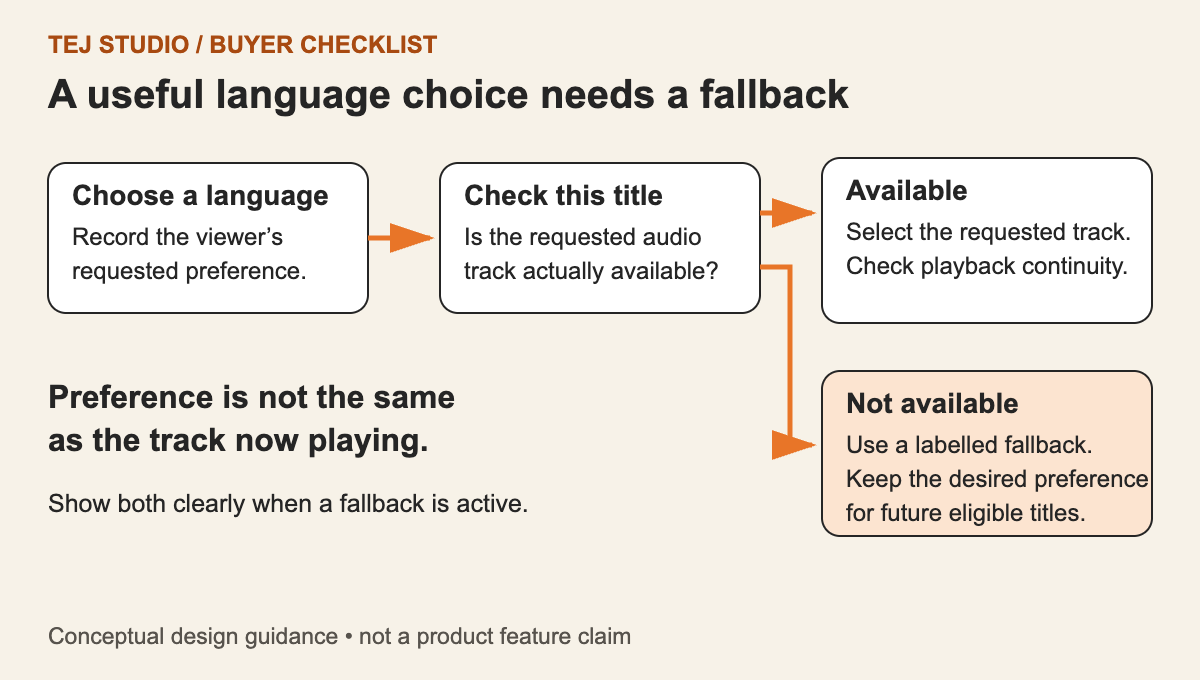
A preference is something meaningful, such as Punjabi audio or English audio description. A track is the particular audio option available in one media item. Do not assume 'track two' represents the same language in every episode.
Current Android Media3 supports preferred audio languages and role flags, and can apply language constraints across playlist items. Its documentation also distinguishes the tracks available in an item from those currently selected. That gives developers useful building blocks, but does not define your service's account-level preference policy.
Our recommendation is to record the intended language and role separately from the currently playing track. Treat an explicit change during playback as a clear choice, not something to overwrite silently when the device's language differs.
Write a fallback policy viewers can understand
Agree a selection order with your team. One possible policy is: a viewer's explicit selection for this title, then their saved profile preference when supported, then the title's designated original or default audio. This is a proposed product rule, not a universal player standard.
If the preferred language is unavailable, show what is actually playing. A message such as 'English audio is unavailable for this episode; playing Punjabi original' is more useful than leaving an English selection highlighted while different audio plays.
Also decide where choices persist: only this playback session, this title, this profile or across devices. For shared households, profile-level preferences may be more appropriate than one account-wide setting.
Check the media package, not only the app
The app cannot select an audio rendition that the delivered stream does not expose correctly. Apple's HLS authoring guidance requires separate audio streams for alternative audio content and requires alternative audio to cover the full content duration. These are packaging requirements for that delivery target, not proof that every player behaves identically.
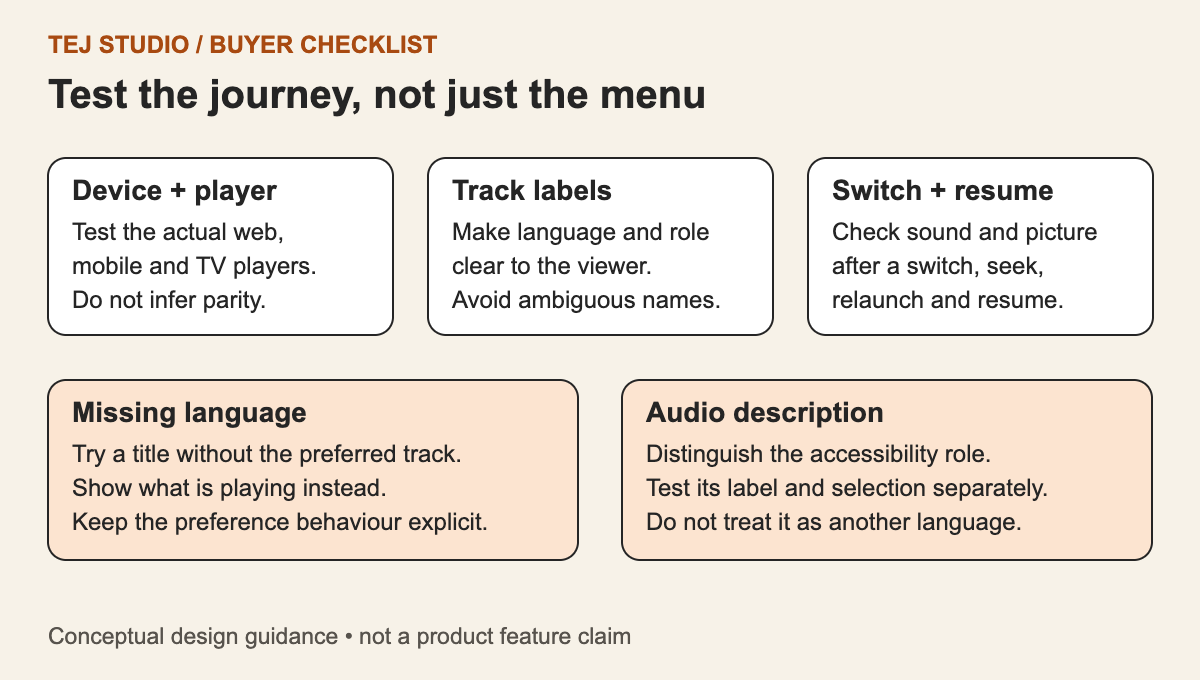
Ask for a sample title with the actual launch languages. Check labels, language metadata, role, timing and the relationship between the audio renditions and video. Distinguish 'English original', 'English dub' and 'English audio description' where those options genuinely exist. Do not invent unavailable tracks simply to make the menu look complete.
Run a language-switching acceptance session
Use recognisable dialogue in each supplied language and record both the selected label and the audio heard. Include these cases in the agreed test scope:
- Switch during a sentence, then seek forwards and backwards. Check audible language, playback position and lip-sync.
- Pause, leave the player and resume. Confirm the chosen language follows the agreed persistence rule.
- Move to an episode without that language. Verify the documented fallback and honest on-screen status.
- Change video quality or recover from a network interruption. Check that audio does not unexpectedly revert.
- Change audio with captions enabled. Confirm caption behaviour follows its own agreed preference, rather than assuming audio and text must always match.
- Where included in scope, repeat on TV remote controls, casting receivers and downloaded playback. Do not count a mobile-only test as coverage of these journeys.
Make the handover evidence useful
For each supported app and device family, retain the test title, language options, expected result, observed result and app version. A short recording with audible dialogue is stronger evidence than a screenshot of a ticked menu option. Assign failures to the right layer: incorrect content, packaging metadata, selection logic or interface feedback.
Before sign-off, agree who fixes a missing dub, who corrects a label and who updates the app. That distinction keeps a content delivery issue from becoming an unexplained software change request.
Scope the multilingual experience before building
For an Australian launch, start with the languages and devices your first catalogue actually supports, then define how the same rules will extend to additional markets. A smaller, well-tested language journey is a clearer deliverable than an unqualified promise to support every combination.
Put the thinking to work.
Planning a multilingual streaming service? Send Tej Studio a sample title, your intended devices and the audio-language choices viewers need.
Start a conversation