
OTT & media
OTT content scheduling and rights expiry checks
Before approving an OTT platform, agree when each title appears, when new playback must stop and what happens to someone already watching at expiry. Ask the supplier to demonstrate those rules at the actual availability boundary, including a changed schedule and a failed background job. Keep the approved rules and test evidence together. For an Australian publisher buying a streaming service, OTT content scheduling affects the catalogue, customer messages and access controls. A documentary with a limited screening window needs a dependable release and withdrawal process. The same questions apply when your catalogue includes overseas audiences or content partners.
Create one approved availability record
Start with a small register for each title or separately licensed version. Record the permitted territories, exact start and end, relevant agreement reference, approval owner and current revision. Include trailers and promotional material where their permissions differ. Your content agreement determines these rules; the platform implements the approved interpretation.
Specify an exact cutoff with a named time zone and agreed treatment of the end instant. For example, write whether a new play requested at the recorded end time must be refused. Have the system store a consistent instant and show an unambiguous date and zone to staff.
Keep editorial readiness visible too. A future date should not release a title whose required review is unfinished. Decide who approves publication and who may change the rights record.
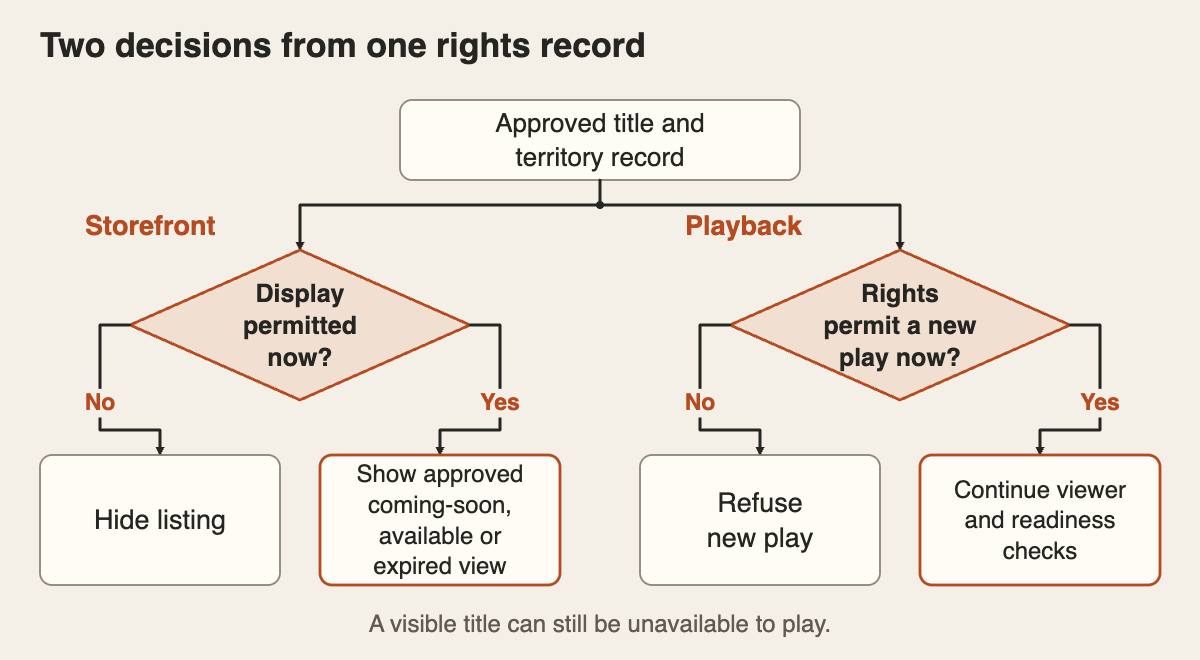
Separate the listing from permission to play
Decide what customers see before, during and after the window. You might permit a coming-soon page before playback opens, then retain an unavailable page after the programme expires. Check the approved permissions for artwork and previews before choosing those views.
Follow the title through search, category pages, recommendations, watchlists and saved links. Define what each surface should show after expiry, including a useful explanation when someone returns to a bookmark.
Hiding a catalogue card does not establish that a saved playback route is blocked. The service that authorises playback needs to evaluate the applicable rights window and territory alongside its other access checks. An active subscription alone should not override an expired title window.
Agree the behaviour for someone already watching
Write separate expectations for a fresh play, an uninterrupted session and a viewer who pauses, closes the app and returns after expiry. Whether an existing session may finish depends on the approved agreement. Ask the supplier to identify any requirement the proposed platform cannot enforce.
Some delivery systems check expiry when a network request begins, allowing that request to finish after the deadline. Players may also hold buffered media. Ask how previously issued playback permissions and later media requests affect the measured cutoff on your chosen delivery path.
Have the supplier demonstrate the agreed outcome rather than relying on an expiry field in an admin screen. If offline viewing is included, give downloaded content its own expiry requirements and tests before accepting that feature.
Make schedule changes safe to repeat
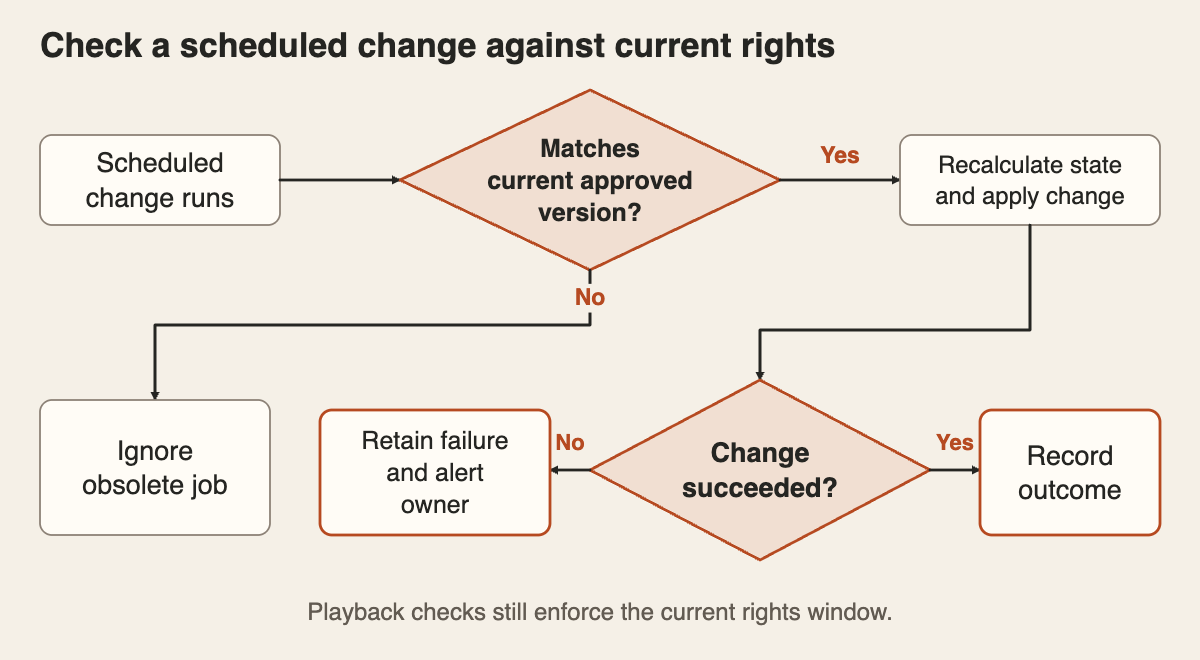
A rights extension, early withdrawal or corrected release date changes work already queued. Ask the supplier to show that an old scheduled job cannot overwrite a newer approved record. A repeated job should leave the correct state intact.
Use background jobs to update catalogue surfaces, with retries and a visible failure queue where supported. Fresh playback decisions should still check the current rights window if the catalogue update is late. Ask which caches or search indexes need refreshing and how staff will discover a mismatch.
Name the person who receives failed-change alerts and can investigate. Keep the requested change, record version, execution result and actual viewer outcome. A scheduled task being accepted is only the beginning of that evidence.
Rehearse the boundaries before acceptance
Use permitted test content and controlled times in a safe environment. Run the following cases on the launch website and apps, with expected results agreed first:
- Before opening, check that any approved preview is visible while the full title refuses a new play. Cross the start boundary and confirm release occurs only when required approvals are complete.
- At expiry, try a fresh play from search, a saved title link and an already-open page. Check the backend decision as well as the visible message.
- Start watching before expiry, then test continuous playback, pause and resume, and reopening the app. Compare each result with the approved session rule.
- Change the expiry, then run an obsolete or repeated scheduled update. Confirm it cannot restore an old window or withdraw an approved extension.
- Delay a catalogue update and inspect a cached view. Verify the current playback restriction, the failure alert and the eventual correction of the listing.
- Where territory restrictions apply, test permitted and excluded locations through an agreed test method. Check the title-specific rule rather than assuming every programme has the same territory.
Record the title, rights revision, device, test time, expected outcome and observed result. Agree how any timing tolerance will be measured and confirm it fits the approved requirements. Keep general picture quality and device testing in the broader playback acceptance checks.
Put ongoing ownership in the quote
Include rights-data entry, approvals, schedule changes, catalogue refreshes, support visibility and repeated boundary testing in the scope. Decide who reviews approaching expiries and records confirmed renewals. An unresolved renewal should not silently become an extension.
For a new OTT streaming platform, add these decisions to your video platform launch plan before choosing the administration screens.
Put the thinking to work.
Planning a timed catalogue release? Email [email protected] with the types of content windows and devices involved. Tej Studio can help you define the supplier questions and acceptance checks. Leave confidential licence documents out of the initial enquiry.
Start a conversation