
Software & technology
Website form enquiries when email goes down
Before accepting a business website, ask the supplier to turn off email delivery in a test environment and show where a submitted enquiry can still be found. Require a saved submission record, an accurate customer confirmation and a staff access route that works without the affected inbox. Email should help the team notice an enquiry, rather than hold its only copy.
Start with the enquiry your team needs to find
Imagine a Perth landscaping business receiving quote requests through its website while the office mailbox is unavailable. The website still loads and customers still submit the form. The buying question is whether staff can retrieve those requests before email returns.
For Australian businesses commissioning a new site, website form enquiries deserve their own acceptance check. This guide covers receipt and email notification. If the form also creates sales records and assigns tasks, use the CRM automation error handling guide for that later handoff.
Save the submission before confirming receipt
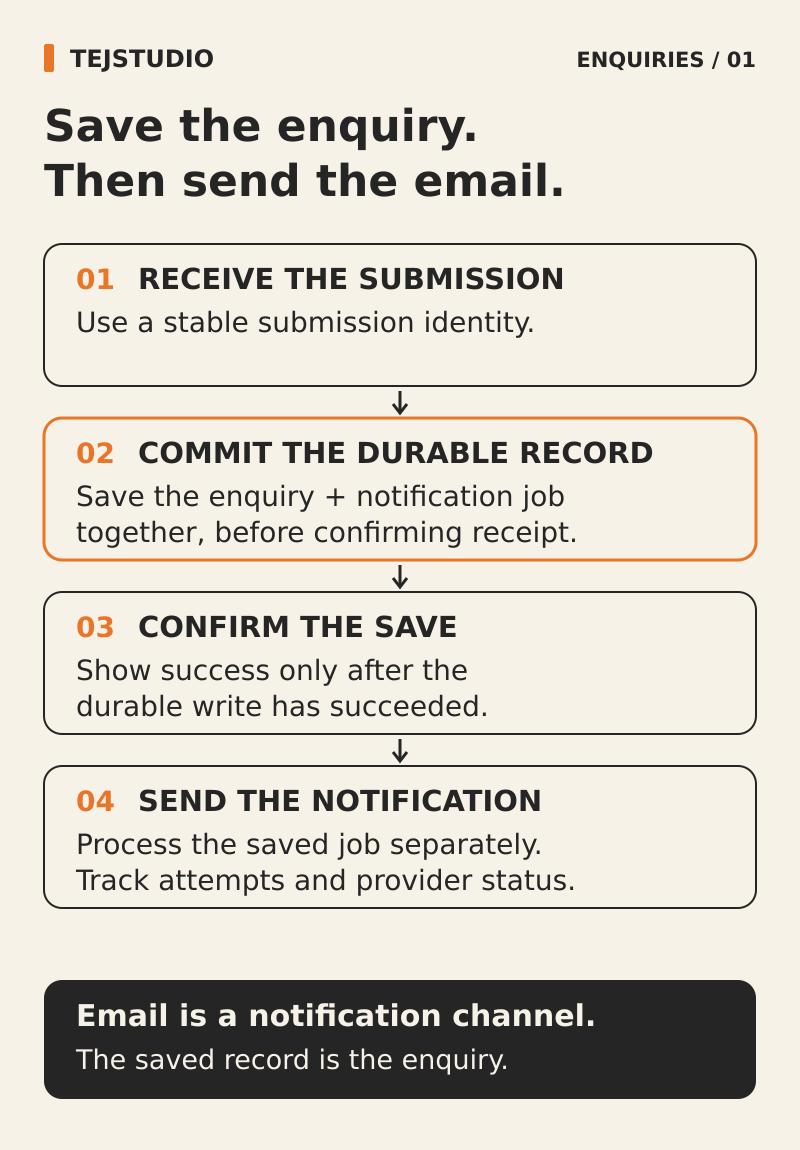
Ask the supplier to identify the system that holds the original submission. A managed form service or a database-backed form can provide that record. The important requirement is that an authorised person can retrieve it independently of the notification email.
Agree which fields are saved, a submission reference and a received timestamp with an unambiguous timezone. Require the server to confirm that the record has been saved before the page says the enquiry was received. The record should remain available after the request finishes or the application restarts.
If saving fails, the page must not display the same success message. Ask for a clear explanation and an agreed alternative contact route. Keep the customer's entered text available where practical, so a failed attempt does not make them start from nothing.
Keep the record separate from the email result
A saved enquiry, a sent notification and a staff response are separate events. Ask to see each without one overwriting the others. A notification failure should leave the saved enquiry accessible, and an email marked delivered should not mark the customer request as handled.
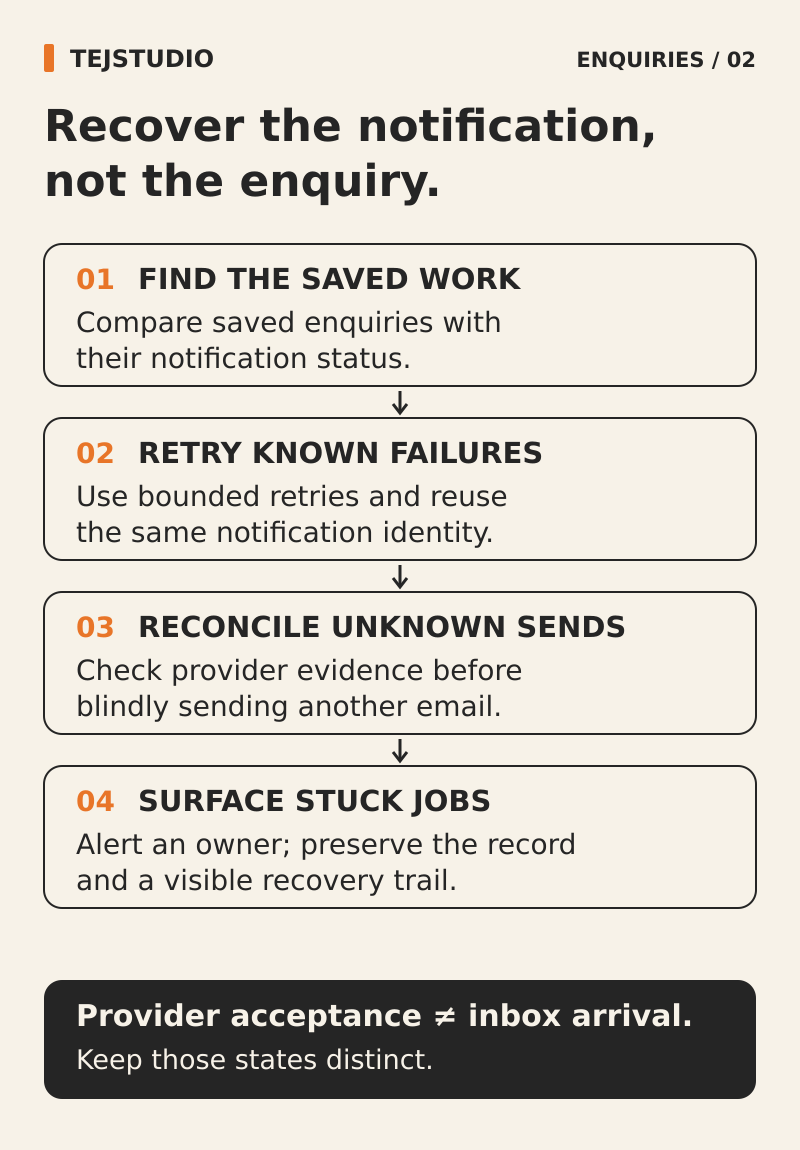
Delivery labels also need explanation. Postmark, for example, records an email as delivered when the recipient's mail server accepts it. That server may still place it in spam or hold it for further checks. The label does not establish that somebody saw the enquiry.
The customer's acknowledgement email has the same dependency. Use the on-screen confirmation to explain that the enquiry has been received when storage has succeeded. Avoid making a promised email the only way the customer can tell what happened.
Make staff access usable during the outage
Have an office team member open the submission list using their own authorised account. They should be able to find the request by reference or received time, read the details needed to respond and record that it has been reviewed.
Test the login dependency too. If the only sign-in route sends a link to the unavailable mailbox, the submission list may be out of reach at the moment it is needed. Agree a provider-supported access and recovery method that does not depend on that mailbox, without weakening account security.
Nominate who checks the list during an incident and who covers an absence. An outage warning sent only through the same failing email service is a weak fallback. Include a suitable alternative alert route or a documented manual check.
Ask what happens when notification retries end
For a custom form, ask how pending email work remains discoverable if the application stops between saving the enquiry and scheduling its notification. The implementation should account for that gap, rather than assume both actions always finish together.
Also ask how long pending notifications remain available and what happens at the retry limit. A queue can expire or discard failed work, depending on the service and configuration. Keeping an enquiry only in a temporary sending queue leaves that limit attached to the customer's request.
Agree a retention period for the submission record separately from email logs and retry queues. Limit access to the people who need it, collect only information needed for the enquiry, and avoid copying full customer messages into every operational alert.
Run an email outage acceptance test
Use clearly labelled test enquiries in an isolated environment. Do not interrupt the live business mailbox to stage the demonstration. Record the expected result and evidence for these cases:
- Email sending is unavailable: the enquiry is saved, the customer sees an accurate receipt and staff can retrieve the original details.
- Submission storage is unavailable: the page does not falsely confirm receipt and offers the agreed next step.
- A notification is accepted by the mail server but absent from the inbox: staff can still find the enquiry without relying on the email status.
- Pending notification work reaches its configured stopping point: the original enquiry remains accessible for its agreed retention period and the failure is visible.
- The office mailbox cannot be used for sign-in: an authorised staff member can still use the agreed access route and find the test request.
Put the operating details in the website scope
Keep the demonstrated access route, review responsibilities, retention settings and notification failure procedure with the website and software handover checklist. Repeat the relevant checks when the form service, email provider or sign-in method changes.
For a new build, explore Tej Studio's custom business websites and bring one real enquiry journey to the scoping conversation. A useful brief explains where requests must be retained and how the team will find them when email is unavailable.
Put the thinking to work.
Discuss your website enquiry workflow with Tej Studio. Discuss your project with Tej Studio. Explore CRM automation error handling guide · website and software handover checklist · Tej Studio's custom business websites.
Start a conversation